












Having Trouble Logging into the AAA Mobile App?
At the time of downloading the app, your phone tower's physical location may be used automatically to decide which AAA Club you should be logging into. Sometimes this can prevent you from reaching the AAA Western and Central New York login page.
Or, you may have previously used the AAA Mobile App under a different club's membership and now you are an AAA WCNY member.
Here's how to get onto AAA Western and Central New York's login page in the App:
1. When you look at the AAA Mobile App tile on your phone, is the icon white with the red and blue AAA logo?
If YES: Proceed to step 2.
If NO: Examine the Home page of the AAA Mobile App - do you see a "More+" icon, or a "Change Club" or "Change Home Zip Code" link anywhere on that page? Select it to change your home zip code to your WCNY region one. This will redirect you to the right AAA WCNY App and Login page link.

2. When you look at the AAA Mobile App's Home Page - do you see a message that says "Welcome!"?
If YES: does this Login page show a yellow on the bottom that shows the zip code the Login page is using? Is it your WCNY Zip Code? If No, please change this to be a WCNY region zip code:
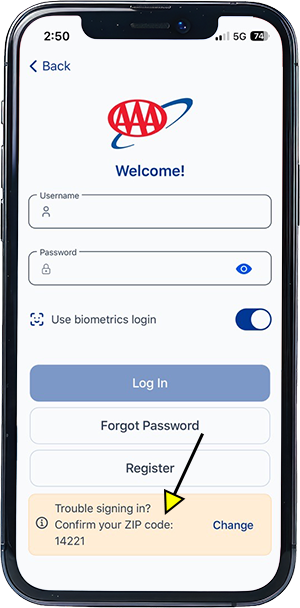
3. Does the Login page look just like the below, asking for your Email and Password? If YES: submit that information:
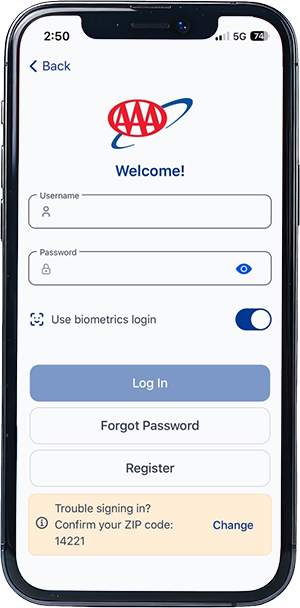
If you confirmed you are on the correct login page but the login will not work: does the error message say "Unrecognized email address or password. If so either:
- Create an online account using the 'Register' button
- Reset your online account password using the 'Forgot Password' button.
Still experiencing trouble? Please delete the AAA Mobile App from your phone and download the AAA Mobile App using these instructions. Make sure you enter your WCNY region Zip Code on the opening AAA Mobile App page. This is a key step to the right login page.
Complete the form below and we can also help get you back on track.