













AAA Mobile App
Steps to Download the AAA Mobile App, How to View Your Digital Membership Card
Download and Log Into the AAA Mobile App:
1. Download the AAA Mobile App on the Apple App Store or Google play store.
2. Open the AAA Mobile App. First time registrants: a page presents asking for your zip code. Enter the zip code in the WCNY area (note: if an out of area zip code appears here: be sure to change it to a WCNY region zip code).
3. The home page appears with a "Welcome, Guest! Log In" message (if not lotted in). Click Log In which will present you with a page to login. For detailed login steps with screen shots visit this Help page.
View Your AAA Membership card:
1. After successful login, your AAA Digital Membership card will appear on the App's home page.
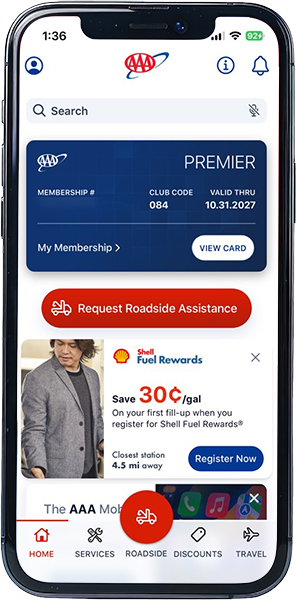
iPhone Devices: Save the card to your digital wallet
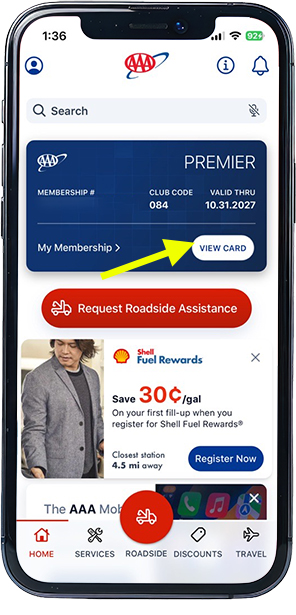
2. Click the View Card link:
3. The card appears again. Click the Go to Apple Wallet link:
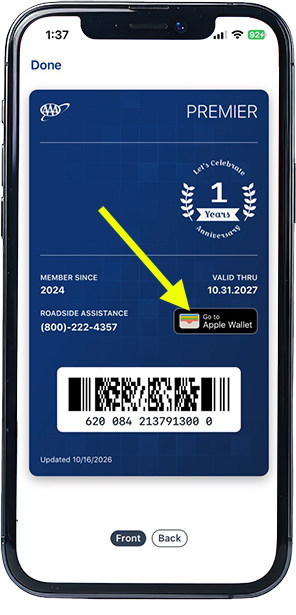
The card is now in your wallet.